


My BMW
4.84.46K Reviews
App Specs
- Version
- 6.7.5
- Updated On
- License
- Free
- Downloads
- 500,000+
- Developer
- BMW
- Categories
- Travel & Local
- Platform
- Android, iOS
Screenshots
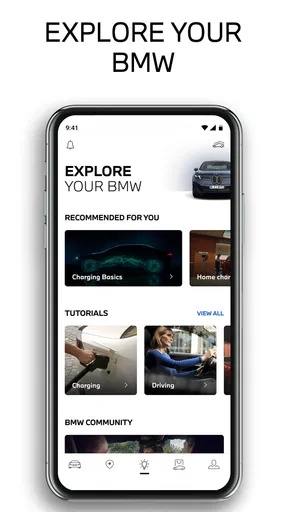
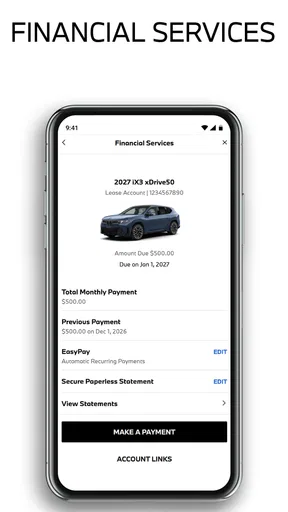
 Analysis by AppCompare
Living with a BMW is easier when the car is not treated as a separate object from the rest of your day. That is the idea behind My BMW, a free Travel & Local app from BMW that brings vehicle-related information and connected routines into one mobile space. I found its value less in flashy presentation and more in reducing the small moments of uncertainty that surround driving: checking the car before leaving, remembering where it is, and keeping an eye on useful details without sitting inside the vehicle.
My overall view is positive, but with an important condition: this is most convincing when you already drive a compatible BMW and want a companion for ownership. It is not a general travel planner, a replacement for every navigation app, or an especially useful download for someone who does not have a BMW to connect to. For the right driver, though, it can turn scattered vehicle checks into a routine that takes only a few seconds.
What the BMW companion app gets right in everyday use
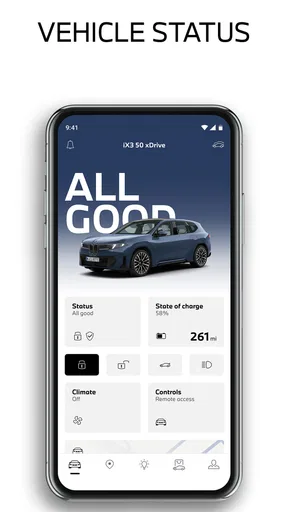
The first thing I noticed is that the app makes the car feel more accessible when I am away from it. Instead of treating vehicle information as something available only after opening the door or switching on the ignition, the phone becomes a practical point of contact. That is particularly helpful before a commute, when I want reassurance that the car is ready, or before walking through a large parking area, when I would rather check its location than rely on memory.
The experience also benefits from being focused on one manufacturer. A general automotive app may offer broad information, but it cannot be tailored around BMW ownership in the same way. The BMW branding is not merely decorative here; it gives the app a clear job. The interface is built around the relationship between the driver and a BMW, so the information feels more relevant than a collection of generic travel tools.
That focus is the strongest reason to choose it over a normal map or reminder app. A map can help me reach a destination, while a calendar can remind me about an appointment, but neither is designed around the state and location of my vehicle. My BMW sits in the space between travel planning and car ownership, which makes it useful during the transitions around a journey rather than only during the journey itself.
A realistic morning routine
Imagine a weekday morning after a cold or busy night. Before leaving home, I open the app to check the car rather than going downstairs simply to confirm everything is in order. If I am heading somewhere unfamiliar, I can use the phone as part of the preparation instead of waiting until I am already seated behind the wheel. That small change matters because it moves avoidable decisions out of the driveway and into a calmer moment.
The same pattern works after shopping or visiting a crowded venue. I may remember the street but not the exact row or entrance where I left the car. Having vehicle-related information available on the phone is more useful than opening a separate map and trying to reconstruct the route from memory. It is a modest convenience, yet these are the situations in which a connected-car app earns its place.
Worth Reading Before You Choose

EA SPORTS FC Mobile 26 Is a Bigger Football Game, but It Takes Time

Flipboard Shows What News Apps Must Do Beyond the Feed

Switching to Android Auto Means Rethinking Your Driving Routine

Google Calendar Makes a Crowded Week Easier to Manage

Ludo King Makes the Most of the Minutes Between Plans

Baby Panda World Brings Quick Play to Modern Phones, but Its Game Library Feels Busy
I also like the possibility of making a habit from the app rather than using it only when something goes wrong. A quick check before a longer trip can become part of the same routine as checking the weather or confirming the address. The benefit is not that every drive becomes dramatically different; it is that the small friction around driving becomes more predictable.
Why the connected approach feels better than separate tools
Using separate apps for maps, parking memories, vehicle notes, and travel planning often creates unnecessary switching. My BMW has a more coherent purpose because the car remains the center of the experience. When I open it, I am not asking, “Which generic tool should I use?” I am checking the relationship between my phone and my BMW.
That distinction is important for people who dislike technical clutter. I do not want to maintain a collection of unrelated shortcuts just to handle ordinary ownership tasks. A dedicated app can be easier to remember and easier to explain to another driver in the household. The learning curve is also gentler when the app’s main subject is obvious from the moment it opens.
There is a trade-off, however. A dedicated BMW experience is naturally narrower than a broad travel platform. If my main need is public transport, walking directions, restaurant discovery, or a complete itinerary across several cities, I would still use a specialist travel app. My BMW complements those tools rather than replacing them.
Details that matter more than the store summary suggests
One useful insight is that the app works best as a pre-drive and post-drive tool, not as something I should be constantly handling while moving. The phone is most valuable when I am preparing to leave, checking the car from a distance, or trying to find it after arriving. That workflow keeps the app practical and avoids turning a convenience feature into another distraction on the road.
A second insight is that the app’s usefulness depends on how consistently I keep it connected to the vehicle and signed in. A connected-car service cannot feel dependable if I only open it after months of inactivity or ignore setup prompts. I would treat the initial pairing and account configuration as part of ownership, then make sure the app remains ready before relying on it for an important trip.
A third insight is that it can reduce mental load even when I do not use it every day. Knowing that I have one place to check vehicle-related information changes how I plan unfamiliar journeys. I can leave more confidently because I am not depending entirely on memory for where the car is or whether I checked something before leaving. That is a quieter benefit than navigation, but it is one I noticed repeatedly.
There is also a useful household angle. If more than one person drives the same BMW, a shared understanding of where to find the relevant information can prevent the usual “Did you check the car?” conversation. The app does not eliminate every ownership question, but it gives the household a common reference point instead of leaving everything to one person’s memory.
Where the experience can become frustrating
The biggest limitation is that the app is not equally meaningful for every BMW driver. Its value is tied to the vehicle and the connected services available for that ownership setup. Someone browsing the app without a compatible BMW may find the experience underwhelming, while a driver expecting every function to behave identically across all BMW models may need to adjust expectations.
That is not a flaw unique to this app, but it affects the buying decision. A general-purpose navigation app offers immediate value to almost anyone with a phone. My BMW is more specialized: its best qualities appear when the car, account, and app are working together. I would not recommend downloading it solely because it has a high store rating if there is no BMW ownership context behind the download.
Another possible source of friction is the difference between convenience and certainty. I appreciate being able to check information remotely, but I would not use a phone display as a substitute for paying attention to the vehicle itself before a long trip. A connected app can support a check; it should not encourage me to skip sensible preparation, inspect the car, or follow local driving rules.
The app can also feel less useful on days when I am not driving. That sounds obvious, but it is worth saying because Travel & Local is a broad category. This is not a daily social app or a universal trip organizer. Its relevance rises around car journeys and falls when my plans involve trains, buses, cycling, or walking. I prefer that focused role, but users wanting one app for every kind of travel may find it limited.
Who should install it, and who should choose something else
I would recommend My BMW to a BMW owner who wants a straightforward digital companion rather than a pile of disconnected tools. It is especially well suited to drivers who frequently park in unfamiliar places, make regular commutes, share a vehicle with another person, or simply prefer checking the car from the phone before heading outside. It also makes sense for someone buying into connected-car habits for the first time and wanting the manufacturer’s own environment.
I would be more cautious if your main requirement is detailed trip planning across different transport types. For that, a dedicated maps or journey-planning service will usually be more flexible. The same applies if you drive several brands and want one neutral app to manage all of them. My BMW is intentionally not neutral, and that is both its strength and its boundary.
It is also not the right choice for a person who dislikes account-based connected services in principle or who rarely uses a smartphone during travel preparation. The app can simplify ownership, but it cannot create value from habits you do not want. In that situation, the car’s normal controls and a familiar map app may be enough.
BMW has kept the entry barrier low: the app is free, carries an Everyone age rating, and is available for devices running operating system version 9 or later. It was released on March 22, 2021, and the current version is 6.7.5. Those details make it accessible to a broad range of phone users, although access to the most relevant experience still depends on having the right BMW ownership connection rather than merely installing the app.
How confidence from other drivers fits my experience
The app has an average rating of 4.8 from around 41 thousand ratings, with roughly 4.5 thousand written reviews. It has also passed 500 thousand installs. Those figures suggest that the idea resonates with a substantial group of BMW drivers, and my experience explains why: the app addresses practical ownership moments instead of trying to become an all-purpose entertainment platform.
I would not treat the rating as proof that every user will have the same experience. Connected-car apps are unusually dependent on the relationship between the phone, the account, and the vehicle. Still, the broad response supports my impression that the central concept is sound. When the app is used for the tasks it is designed around, it feels like a sensible extension of the car rather than an unnecessary duplicate of a map.
My final verdict on the BMW ownership experience
After using it as a vehicle companion, I see My BMW as a focused convenience app with a clear audience. Its best contribution is not replacing navigation or transforming a drive; it is making the moments before and after driving less uncertain. Checking the car, preparing to leave, and finding it again are ordinary tasks, but bringing them into one BMW-centered experience makes them easier to manage.
The limitations are equally clear. It is not a universal travel solution, its value depends on the connected BMW relationship, and it should support responsible vehicle checks rather than replace them. Drivers who want broad travel coverage or brand-neutral tools may be happier elsewhere.
For an existing BMW owner, though, I think the free download is worth trying. My BMW is at its best when it becomes a quiet part of a driving routine: open it before leaving, use it when the car is out of sight, and let specialist travel apps handle the parts it was never meant to cover. That makes it a practical recommendation rather than an app I would suggest to everyone.
BMW is the developer, and the app’s short store description is simply “My BMW,” while its broader summary is “Your World. My BMW.” I find the shorter description more accurate in practice. The app is not trying to manage my whole world; it is most useful when it keeps one important part of it—my BMW—within easier reach.
Pros
- Remote vehicle controls make it easy to check status or lock the car.
- Live vehicle location helps you find your parked BMW quickly.
- Service reminders simplify maintenance planning and appointment scheduling.
- Digital key support can replace a physical key on compatible vehicles.
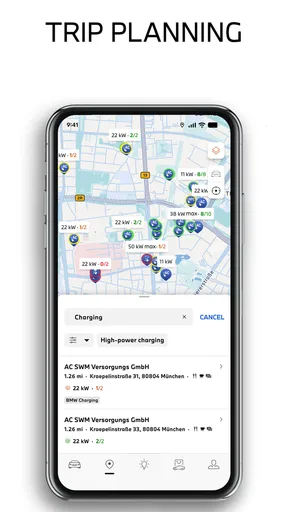
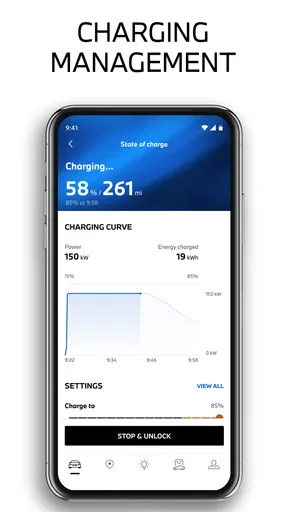
- Trip and charging information is useful for monitoring electric BMWs.
Cons
- Many features require a compatible BMW model
- equipment
- and active services.
- Remote commands may respond slowly when the vehicle has weak connectivity.
- Some functions require extra permissions
- including location and Bluetooth access.
- The app can use significant battery if location-based features stay enabled.
- Certain connected services may require a paid subscription after a trial period.
FAQs for My BMW
What is the My BMW app used for?
My BMW is the official companion app for compatible BMW vehicles. After signing in with a BMW ID and adding your car, you can review important vehicle information, check its location, see fuel or battery status, schedule service, and manage selected remote functions. Available tools vary depending on the BMW model, production year, country, equipment, and connected services included with the vehicle.
Can I use My BMW with any BMW vehicle?
Not every BMW supports the complete My BMW experience. Compatibility depends on the vehicle’s model, year, market, infotainment system, optional equipment, and active ConnectedDrive services. Newer vehicles generally offer more features, while older models may provide only basic information or limited remote controls. Before downloading, check BMW’s compatibility information and confirm that your vehicle is linked to a supported BMW ID.
Does My BMW allow remote control of the car?
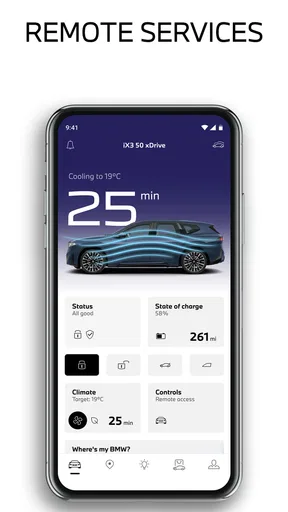
On supported vehicles, My BMW can provide remote functions such as locking or unlocking the doors, checking whether the car is secured, locating the parked vehicle, and activating climate control. Electric and plug-in hybrid models may also support charging schedules, battery status, and preconditioning. These features require network coverage, suitable vehicle equipment, and an active service, so they may not work in every situation.
Is My BMW free to download and use?
The My BMW app is generally free to download from the official Android or iOS app store, but some connected features may depend on a paid BMW ConnectedDrive subscription, a trial period, or services bundled with the vehicle. Mobile data charges may also apply. The exact pricing and feature availability differ by country, vehicle, and account, so review the terms shown in your BMW account.
What information and permissions does My BMW require?
My BMW normally requires a BMW ID, vehicle identification details, and an internet connection to synchronize information with BMW’s servers. Depending on the features you use, the app may request permission for notifications, location access, Bluetooth, and mobile data. Location permission is particularly useful for finding your vehicle or navigating to it. You should review the privacy policy and enable only permissions you are comfortable granting.


